How can I cancel my VIP membership?
Last updated:
Yes. You can cancel your VIP membership online anytime without calling customer service.
If you only want to avoid this month’s membership charge, “Skip the Month” may be a better option than canceling. Skipping keeps your membership active for the month, so you can continue shopping at VIP prices and redeem any eligible unused VIP Credits already on your account while your membership remains active.
Please note: cancellation is currently available on the website only, using either a desktop or mobile browser. Cancellation is not currently available in the app.
To cancel your VIP membership online:
1. Log in to your account on the website.
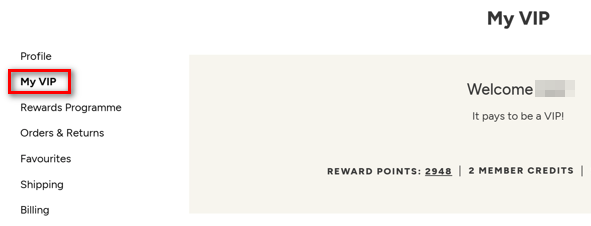
2. Go to your Account Profile page.
3. Select “My VIP.”
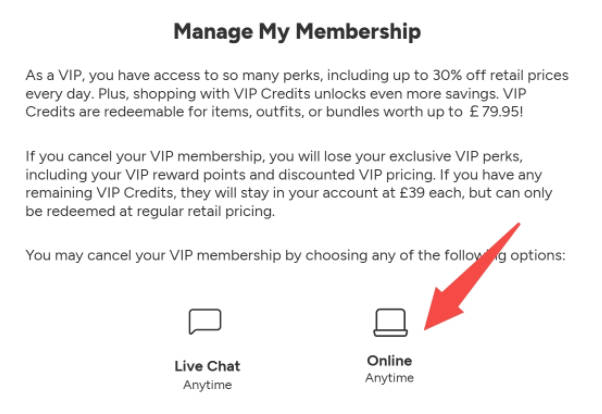
4. Scroll down to “Manage My Membership.”
5. Select “Online.”
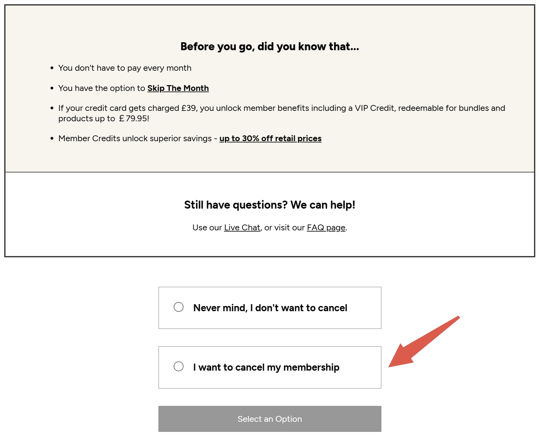
6. Follow the prompts to confirm your cancellation.
Please note:
– Your cancellation takes effect immediately once it is successfully confirmed.
– You may see additional confirmation screens or optional offers before your cancellation is completed.
– If you still wish to cancel, continue following the prompts until you reach the final confirmation step.
– Canceling your VIP membership stops future membership charges, but it does not automatically refund any previously processed membership charges.
– If your account has unused and unexpired VIP Credits after cancellation and you would like to request a refund, please contact our customer service team via Chat.
If you are unable to complete your cancellation online, please also contact us via Chat for assistance.
Was this article helpful?